
While you were away
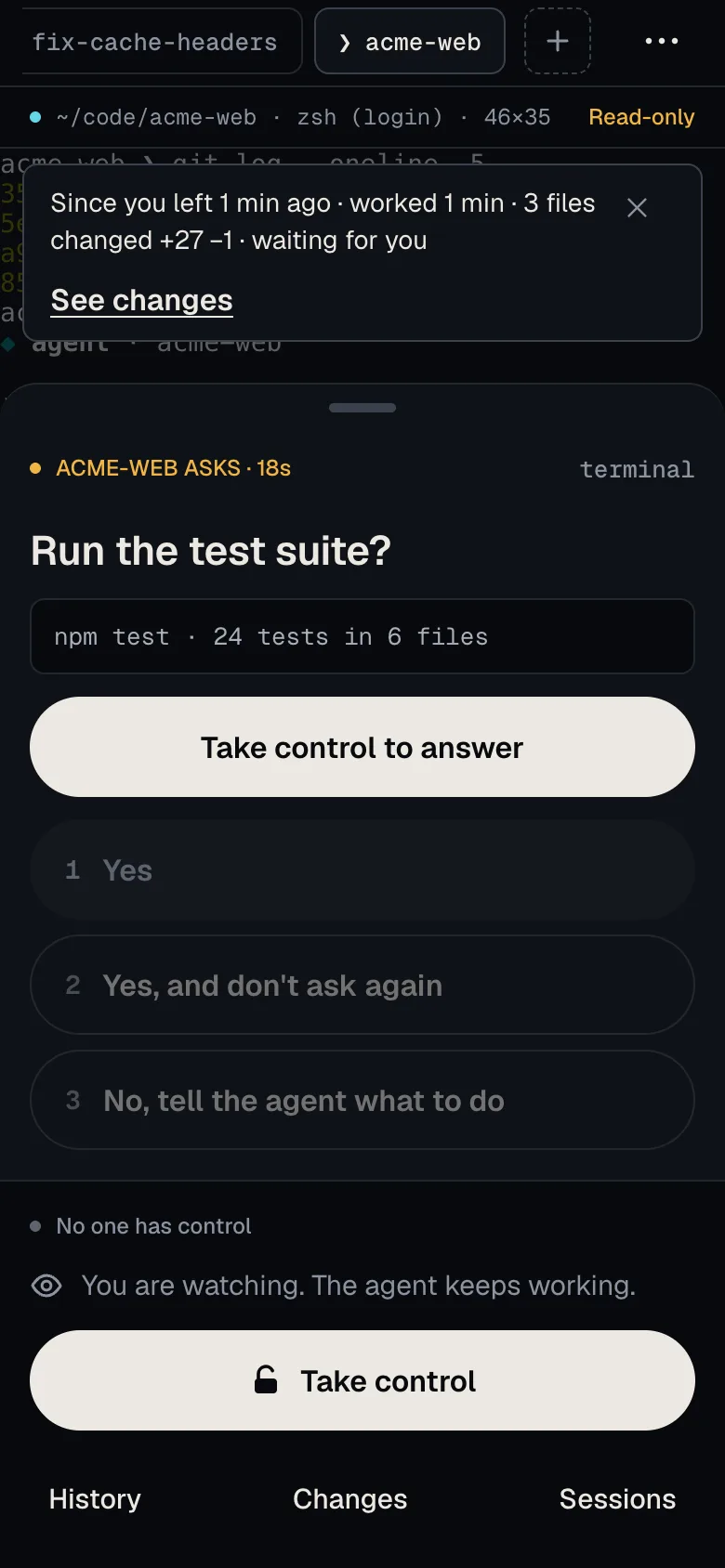
When you open a session after time away, Termivoa can show a recap card at the top of the live terminal that says what the agent did, for example:
Since you left 32 min ago · worked 14 min · 5 files changed +120 −34 · waiting for you
When does the recap card show?
Section titled “When does the recap card show?”The card shows only when:
- the agent worked one minute or more while this phone was away; or
- the agent waits for you, or finished and it is your turn.
It shows once per visit, and each phone tracks its own visits.
What does each part mean?
Section titled “What does each part mean?”- Since you left: the last time this phone showed the session.
- worked: the agent’s busy time, as your computer saw it.
- files changed: uncommitted changes in the session’s git project.
- waiting for you or your turn: the agent’s state.
Unknown parts are left out, such as the file count in a folder outside git. Termivoa never reads terminal text for the card.
Use the recap card
Section titled “Use the recap card”Tap See changes to open Changes, or tap ✕ to close the card. It also closes when you tap elsewhere, or after 12 seconds.