
Termivoa + herdr
Termivoa shows the projects of your computers’ herdr on your phone, so you can see which coding agent is blocked, open its terminal and answer it.
What is herdr?
Section titled “What is herdr?”herdr is a terminal workspace tool, and the first provider that Termivoa supports. It runs coding agents in workspaces, tabs and panes. Termivoa reads each computer’s herdr and shows its projects on the phone. It opens one herdr terminal at a time in Live.
A computer without herdr shows no herdr tab, and nothing changes.
What do I need?
Section titled “What do I need?”| Need | Detail |
|---|---|
| herdr 0.8.2 or later | Installed on that computer: Homebrew herdr, or in ~/.local/bin or ~/.cargo/bin, or on the PATH that Termivoa runs with. |
| herdr running | Its server must run. If it does not, tap Start herdr on the phone. Only the default herdr session shows. Named herdr sessions do not show. |
| macOS or Linux | Windows is not supported. |
| Termivoa from the next beta | On that computer. |
| A setting | None. Termivoa finds herdr by itself within about 30 seconds, also when you install herdr while Termivoa runs. The phone shows it the next time you open Termivoa or switch back to it. |
What do I see on the phone?
Section titled “What do I see on the phone?”On the Sessions list, a herdr tab sits between Sessions and Needs you. A number on the tab counts the terminals that are blocked or done, on the computer you chose in the side menu (or on all computers in All computers).
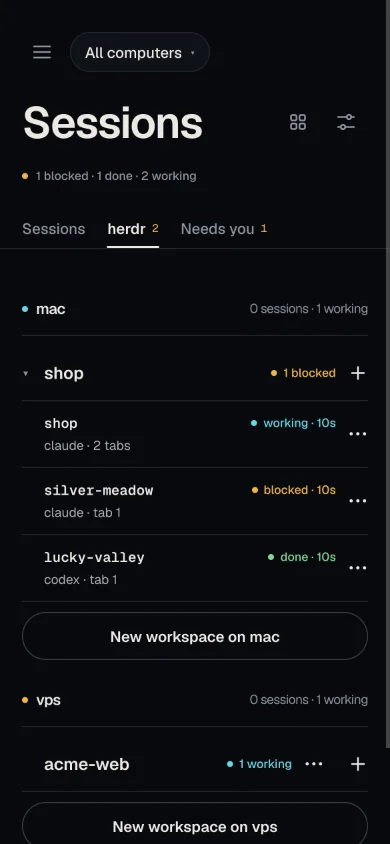
In the herdr tab:
- One row for each project (a git repository). Tap ▸ or ▾ to fold or unfold it.
- Under a project, its worktrees, with the main checkout first. A workspace that is not in git is one row. A git project with only its main checkout is one row too, and keeps its +.
- With more than one computer and All computers chosen, each computer’s projects are under a header with its name and state, such as mac and 2 sessions · 1 working.
- A folded project with several worktrees says 2 worktrees.
- A line under a worktree names the agent and the tab, for example
claude · tab 1. The list never shows terminal titles or screen text. You see a terminal’s screen only when you open it.
A state word shows on the right of a row:
| Word | Meaning |
|---|---|
| blocked (amber) | The agent waits for you. |
| done | The agent finished. It stays until someone looks at it in herdr on the computer. A done row that you opened on the phone is dimmed. |
| working | The agent works. |
| idle | The agent is idle. |
| no word | The state is unknown, or there is no agent. |
A project shows its most urgent word with a count, such as 1 blocked or 2 working.
The status line says, for example, 1 blocked · 1 done · 2 working, or herdr · nothing running. When something is blocked, the button Open the blocked agent opens the first blocked agent.
The Sessions tab also lists the herdr worktrees that have an agent with a state, under herdr, above Termivoa sessions. In All computers, they are under each computer’s header.
What if herdr has a problem?
Section titled “What if herdr has a problem?”The problem shows on the herdr tab only. The Sessions list never waits for herdr.
| Message | What to do |
|---|---|
| herdr is not running on mac | Tap Start herdr on that notice. If there is no button, start herdr on that computer. Its projects then show here. |
| Update herdr on mac | This version is too old for Termivoa. Update to herdr 0.8.2 or later. |
| herdr on vps · can’t reach | Tap Retry. |
How do I open a terminal and answer?
Section titled “How do I open a terminal and answer?”- In the herdr tab, tap a worktree row.
- The herdr terminal opens full screen in Live. The tabs of that herdr workspace show as chips on top. ‹ Sessions goes back.
- It opens read-only. Tap Take control to type. See Take control to type.
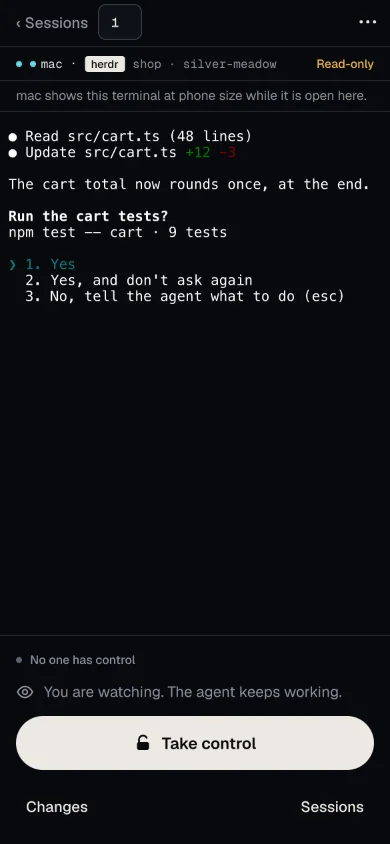
The keys, typing, compose, snippets, answer cards and Changes work as in any session. These are not offered for a herdr terminal: History, rename, end session, photos, project buttons that start a new session, preview and the worktree menu.
A tab without an agent opens too (herdr 0.8.2 and later). If herdr cannot open it, its chip is off (greyed). Update herdr to open that tab.
If the herdr pane closes while you watch, Live says Closed here and “This terminal is no longer open on this phone. Its row in Sessions stays.” Tap Open again.
When does the phone buzz?
Section titled “When does the phone buzz?”The phone buzzes when a herdr agent is blocked or finished. Turn on notifications first: see Turn on notifications.
| When | Text |
|---|---|
| An agent is blocked | <agent> needs you. Tap to answer. |
| An agent finished after work | <agent> finished after <N> min., or <agent> finished. under a minute |
- The title is
herdr · <project> · <worktree>(one name when both are equal). A name is cut to 40 characters. - A finished buzz needs at least 20 seconds of work that Termivoa saw.
- A blocked buzz needs the agent to stay blocked for about 2 seconds, so a short blip does not buzz.
- A tap opens that terminal at once.
- herdr buzzes have their own limit, 6 per minute, so they never use up the buzzes of your normal sessions.
- The text has only the agent and the project and worktree names, never terminal text.
- A sound on the computer and nothing on the phone? See I hear a sound but see no notification.
How do I turn herdr off or the buzz off?
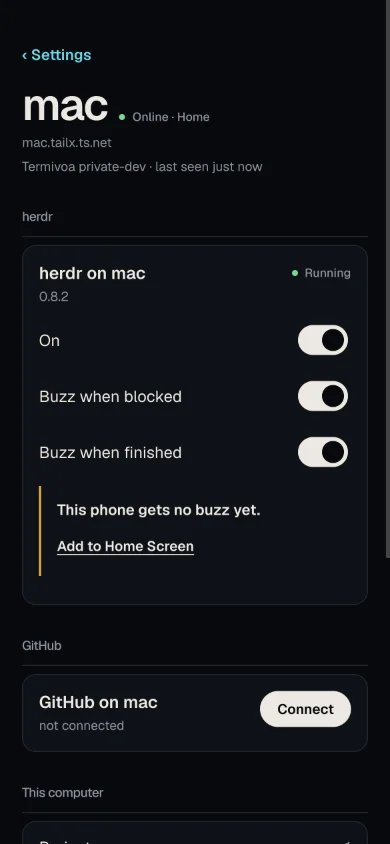
Section titled “How do I turn herdr off or the buzz off?”Open Settings and tap the computer’s card, such as mac. Its page has a herdr part with the row herdr on mac, the herdr version and a state word: Running, Not running, Update or Off. The card on the Settings main page shows the same state as a dot on its herdr chip.
| Switch | What it does |
|---|---|
| On | Off: the herdr tab leaves out that computer, the computer stops reading herdr and closes its open herdr terminals, and there is no buzz. This is for every phone. The card says “Off for every phone: mac does not show herdr or buzz for it.” |
| Buzz when blocked | Turns the blocked buzz on or off. |
| Buzz when finished | Turns the finished buzz on or off. |
The switches are saved on that computer, for every phone.
Next beta: under the switches, “This phone gets no buzz yet.” shows while a buzz switch is on and Termivoa can tell that this phone has no notifications from that computer. Its link (Turn on notifications, Add to Home Screen or See why) goes to Settings → Notifications.
How do I create a worktree?
Section titled “How do I create a worktree?”A worktree is a second folder of a git repository on its own branch. herdr makes it and can start an agent in it.
- In the herdr tab, tap + on a git project row.
- In the sheet New worktree, type a Branch name: lowercase letters and digits joined by
-,.,_or/, such asfix/login-redirect. It can have up to 64 characters and at most 4 parts, and cannot end in.lock. - Under Start an agent in it, tap an agent that already runs in this herdr (such as
claudeorcodex), or No agent. The sheet reads the list again when it opens, so it shows the agents that run there now. If the agent you picked left herdr in the meantime, the sheet goes to No agent and says so, for example “codex is not running in herdr now.” It never starts another agent in its place. - Optional: write a First prompt (optional). It cannot have control characters such as Esc.
- Tap Create and start (or Create with No agent).
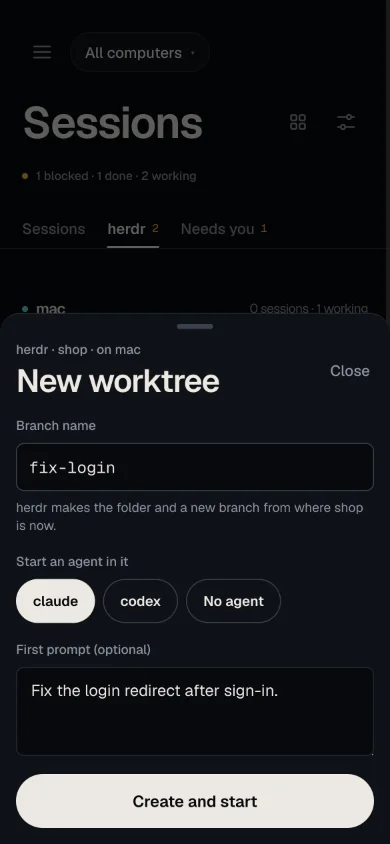
The sheet says “herdr makes the folder and a new branch from where shop is now.” It takes up to about 45 seconds. Then the new terminal opens. Termivoa sends the first prompt when herdr says that the agent is ready for input.
If something goes wrong, the app says why:
| Message | What to do |
|---|---|
| “fix-login” already exists in shop. Pick another name. | Use another branch name. |
| shop is not in git, so it cannot have worktrees. | Use a project that is in git. |
| herdr could not make the worktree. Nothing was opened. Try again or pick another name. | Try again, or pick another name. |
| too many requests; wait a minute and try again | This phone asked for more than 3 new worktrees or agent tabs in a minute. Wait a minute. |
| herdr is busy with another change; try again | Another change runs in herdr on that computer. Try again in a few seconds. |
| herdr on vps is busy, or this phone asked for too many worktrees just now. Wait a minute, then try again. | The same two causes, on a computer that you added. Wait a minute. |
| The worktree is ready, but the agent did not start. | Open the worktree and start the agent yourself. If its terminal says “command not found”, install that agent on the computer. |
| The agent started and waits at a question. Your prompt was not sent. | Answer the question, then send the prompt. With no first prompt, the text ends after “question.” |
| The agent started, but your first prompt was not sent. | The agent was not ready in time. Send the prompt yourself. |
How do I manage workspaces and worktrees?
Section titled “How do I manage workspaces and worktrees?”In the herdr tab, each row has a ⋯ button. It opens a menu for that workspace.
| Action | What it does | Before it acts |
|---|---|---|
| New tab | Makes a tab in that workspace and opens its terminal. Pick Shell, or an agent such as claude; for an agent you can type a First prompt (optional) and tap Start. |
Nothing to confirm. |
| Close tab | Ends one tab of that workspace. The menu lists the tabs. The last tab has no Close tab: use Close workspace. | Asks “Close tab 2? Its terminals end.” |
| Close workspace | Ends the terminals of that workspace. | Asks “Close silver-meadow? Its terminals end. Files stay.” |
| Remove worktree | Closes a worktree and deletes its folder. Only a worktree has this action, never the main checkout. | Asks “Remove the worktree silver-meadow? Its folder is deleted, also files that git ignores (such as .env). The branch stays.” |
| New workspace | A button under the list. Pick one of that computer’s Termivoa projects; herdr opens a workspace in its folder and the phone opens its terminal. For a folder that is not a project yet, tap Add a folder in that sheet, or From GitHub to put one of your repositories on that computer (Next beta, see GitHub). | Nothing to confirm. |
A worktree that you closed keeps its folder. It then shows under its project as a dimmed row with closed. Tap Open to get its workspace back.
A herdr terminal has the same ⋯ button at the right of its tabs, so you can make or close a tab, or close the workspace, without going back to the list.
What Termivoa never does:
- It never removes work that is not committed. The app then says “silver-meadow has changes that are not committed. Commit or discard them first.” and nothing changes.
- It never closes two workspaces in one tap. For a project’s main checkout with open worktrees, Close workspace is off and says “Close its worktrees first.” When herdr lists two workspaces under one project and both are at that project’s main folder (herdr has its worktree record of the same repository for each), it is off for both and says “herdr closes the workspaces at this project’s main folder only together. Close them in herdr on mac.” A second workspace in the same folder that herdr lists as its own project closes alone.
- It checks the name again. If the list changed after you looked, the app says “The list changed. Look again, then try again.” and nothing changes.
Remove worktree deletes files that git ignores, such as .env and build output, with the folder. The branch and its commits stay.
Add a folder opens a terminal on that computer with pterm project add typed in. Type the folder, such as ~/shop, press Enter, go back, and tap Check again in the New workspace sheet. The phone never sends a folder path by itself: you type it in a terminal on that computer.
The + on a project row shows for every project whose folder is a git repository. A project that is not in git has no +.
How do I install or start herdr from the phone?
Section titled “How do I install or start herdr from the phone?”Open Settings and tap the computer’s card. The page of each computer (macOS or Linux) has a herdr part.
| The herdr part says | What you can do |
|---|---|
| Not installed, with Install herdr | Tap it. Termivoa opens a new session on that computer with herdr’s install command typed in: curl -fsSL https://herdr.dev/install.sh | sh. Read it, then press Enter there to run it. Termivoa itself downloads nothing. Then tap Check again. |
Not installed, with “Run pterm doctor on mac.” |
A herdr is on that computer, but Termivoa will not use it. pterm doctor says why. |
| Not running, with Start herdr | Tap it. Termivoa starts herdr’s server on that computer. The same button is on the notice “herdr is not running on mac” in the herdr tab. |
A herdr that Termivoa started keeps running when you leave the app. On Linux it also keeps running when Termivoa restarts, if the computer has systemd-run; without it, herdr ends when Termivoa’s service stops.
Why is the pane small on my laptop?
Section titled “Why is the pane small on my laptop?”herdr gives a pane the size of whoever attached last. Termivoa opens the herdr terminal at the phone’s size, so it fits the screen. The line under the tab chips says it: “mac shows this terminal at phone size while it is open here.”
The laptop pane takes the phone’s size, and you can still type there. When you leave Live, or lock the phone or switch apps, the phone stops watching. About 10 seconds later, herdr gives the laptop pane its own size back. When you come back, the terminal opens again.
What are the limits?
Section titled “What are the limits?”| Limit | Detail |
|---|---|
| Open terminals | At most 4 herdr terminals open at once for each computer. Each phone can also open 20 a minute. At either limit the app says “mac cannot open more herdr terminals just now. Close one you do not use, or wait a minute.” They do not count toward Termivoa’s own session limit. |
| Panes | One pane for each open terminal. No split panes. |
| Input | No mouse. No herdr prefix keys: Termivoa sends ctrl+b to the agent as a plain ctrl+b, so the phone cannot send herdr’s prefix commands. |
| Custom prefix | If you set another prefix key in herdr’s config.toml, the phone can send that key. At worst it closes the phone’s own view of the terminal. pterm doctor warns about it. |
| Control | Opening never takes control. You tap Take control. |
| Where they show | herdr terminals are not in the Sessions list, the Wall or pterm list. |
| After a restart | Termivoa does not keep them when it restarts. Open the row again. |
| New agent tab | A new tab that starts an agent counts toward the same limit as making a worktree: 3 a minute for each phone. |
| Manage | Each phone can do 30 manage actions a minute, and one at a time for each computer. A workspace has at most 32 terminals and herdr at most 64 projects in the list. |
| Not from the phone | Force-removing a worktree, renaming, split panes, updating herdr. |
| Platforms | macOS and Linux. Not Windows. |
| herdr sessions | Only the default herdr session. Not named sessions. |
| herdr versions | Termivoa is tested with herdr 0.8.2 and herdr 0.9.3. |
Common questions
Section titled “Common questions”Why is there no herdr tab?
Section titled “Why is there no herdr tab?”herdr is not installed on that computer, or Termivoa cannot find it, or On is off on that computer’s page in Settings, or Termivoa there is older than the next beta. Run pterm doctor on the computer. See The herdr tab is missing.
Can I open a herdr terminal from a link?
Section titled “Can I open a herdr terminal from a link?”Yes. A link to a herdr terminal, or a reload of its page, first shows its names and an Open button: “Open shows it here, read-only.” It opens only after you tap Open in the app, or tap a notification. If the terminal is gone, the herdr tab says “That terminal is gone.”
Can the phone kick my laptop out of a pane?
Section titled “Can the phone kick my laptop out of a pane?”No. Termivoa never takes a pane over from another herdr client. See What does the phone see and do with herdr?
Does this work with several computers?
Section titled “Does this work with several computers?”Yes. Each computer reads its own herdr. The herdr tab shows all of them in All computers, each computer under its own header, or one computer that you choose in the side menu. See Use several computers to add one.