
Project buttons
Termivoa finds your project’s own commands, such as tests or the dev server, and shows them as one-tap buttons in the Snippets sheet.
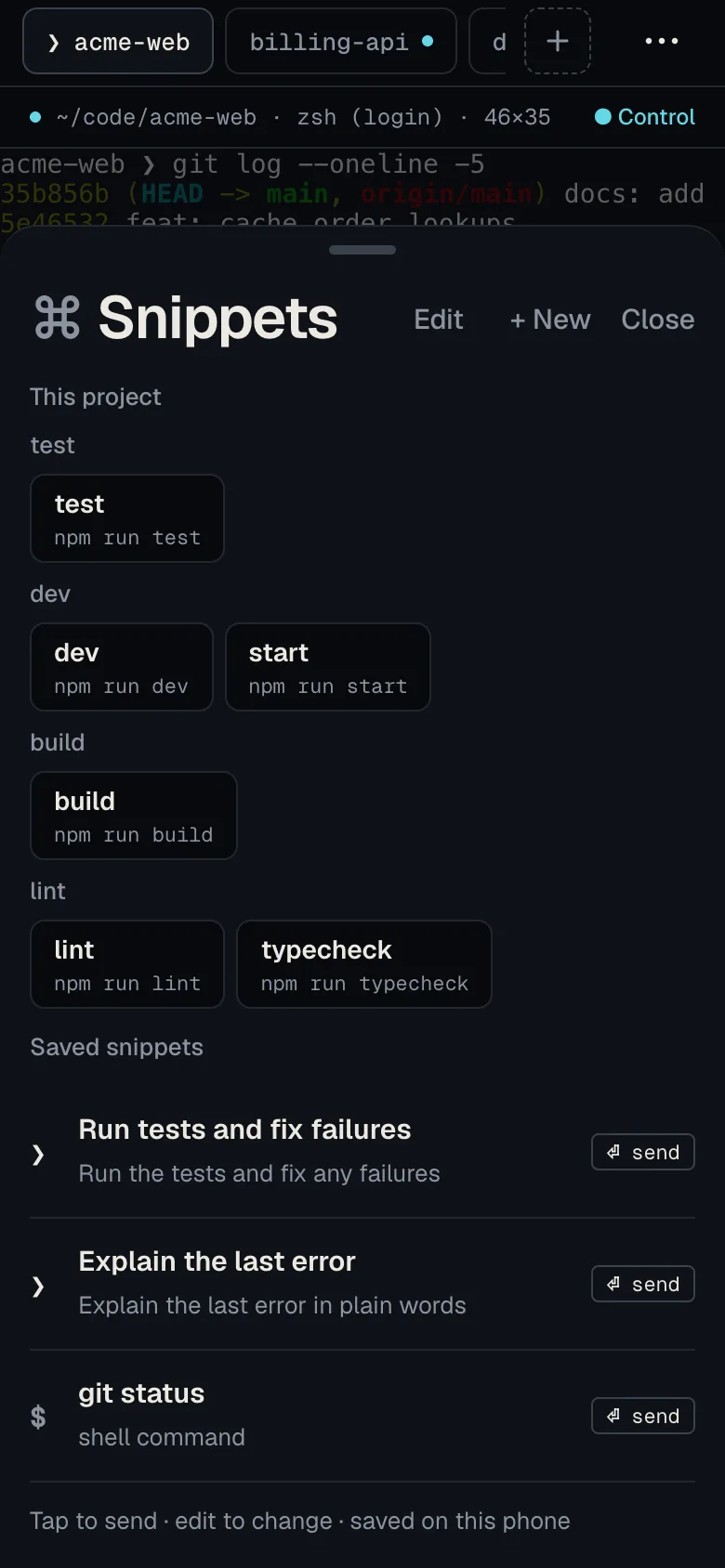
Which commands does Termivoa find?
Section titled “Which commands does Termivoa find?”Termivoa reads these project files:
- package.json scripts, with npm, pnpm, yarn or bun picked from the lockfile (
pnpm-lock.yamlgivespnpm test). - Makefile targets, for example
make test. - Cargo.toml (Rust):
cargo test,cargo run,cargo buildandcargo clippy. - go.mod (Go):
go test ./...andgo build ./....
It only reads them; nothing runs until you tap an action.
Run a project command
Section titled “Run a project command”- In the session, take control.
- Tap snips. This project is at the top.
- Find the command in its group: test, dev, build, lint or other (tap More for more).
- Tap the command, then an action:
- Run in new tab starts a new session in the same project and shell, types the command once (only if no one else has control), and opens it.
- Type here types it in this session and presses Enter.
Why is Type here off?
Section titled “Why is Type here off?”Type here needs control and a normal shell prompt. It is off while a full-screen app like Claude Code is open, or something runs, because the command would go into that program. Use Run in new tab.
When no commands show
Section titled “When no commands show”- No project commands found in a folder: it has none of the files above.
- Could not read the project: tap Retry.
Saved snippets stay below the project commands; see Save and send snippets.